Guide
Book Writing Gantt Chart: Plan Your Manuscript from Outline to Submission
Writing a book without a plan is how manuscripts stall at chapter three. A Gantt chart turns “I’ll write it this year” into a week-by-week schedule with a real submission date — and makes the gap between where you are and where you need to be impossible to ignore.
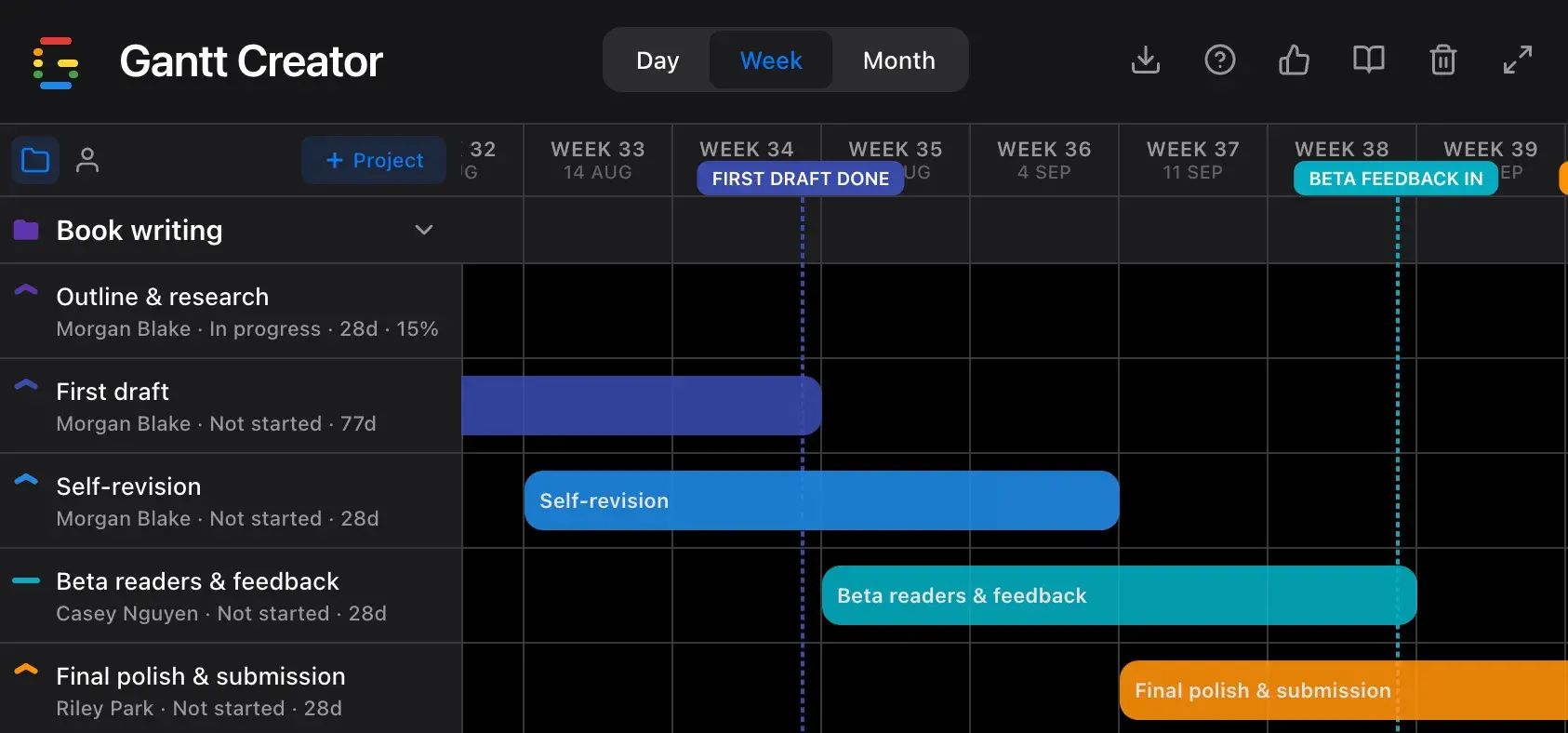
The 5 phases of a book writing Gantt chart
A finished manuscript goes through five distinct phases, and each one has a natural handoff point. Mapping them on a timeline makes the handoffs deliberate — and shows you exactly how much time you’re allocating to each.
- Define your premise, audience, and core argument or story arc
- Map chapter structure — either a full scene-by-scene outline or a loose signpost outline
- Research facts, settings, technical details, or interviews as needed
- Identify gaps in the outline before drafting begins
- Lock the outline and commit to it — changes mid-draft cost weeks
- Set a daily or weekly word count target and stick to it
- Write chapter by chapter without going back to revise earlier chapters
- Mark gaps and unresolved questions with [TK] — fill them in later
- Track word count progress weekly against your target
- Resist the urge to edit — finishing a bad draft beats perfecting chapter one
Tip: The first draft is always longer than the deadline looks. Build in a one-week buffer after your planned finish date before revision starts — most drafts land late, and starting revision under pressure produces poor results.
- Read the entire manuscript in 2–3 days before touching a word
- Revise for structure first: cut or move scenes, fix pacing, plug plot holes
- Then revise at the sentence level: clarity, voice, repetition
- Check consistency: character names, timeline, facts, and terminology
- Produce a clean draft ready for outside eyes
- Send to 3–5 beta readers with a deadline and specific questions
- Ask about pacing, confusion points, and emotional impact — not line edits
- Collate all feedback before making any changes
- Identify patterns across readers — single-reader reactions are noise
Overlap phases 3 and 4 intentionally: send the manuscript to beta readers while you’re doing your own line-level revision. This way you finish self-editing around the same time feedback arrives, and the final polish has both perspectives to draw from.
- Address beta feedback — structural changes first, then line-level
- Professional copyedit or proofreading pass
- Format to submission guidelines or self-publishing platform requirements
- Write query letter, book proposal, or upload package
- Submit — then start outlining the next one
Why writing timelines collapse — and what a Gantt chart shows you
Most writers underestimate revision time and overestimate drafting speed. A Gantt chart makes the hidden dependencies explicit:
- You can’t revise a chapter you haven’t written.
- You can’t send to beta readers until you have a coherent draft — not a work in progress.
- Beta reader turnaround takes 2–4 weeks regardless of how late you send it. That wait is a hard constraint.
- A submission deadline doesn’t move. Every week the draft runs long is a week taken from revision.
When you plot these as bars on a timeline, the critical path becomes visible. You can see exactly how much revision time you’re actually giving yourself — and decide whether that’s enough before you start, not after.
How to build your writing timeline in Gantt Creator
1. Start from your submission or publication date
Create a project for your book. Add your submission deadline as a milestone first, then work backwards to set phase end dates. If you don’t have a hard deadline, set a target — a date without a plan is a wish.
2. Add one task per phase — adjust by dragging
Create five tasks and set durations based on your word count target and pace. Drag bar edges to resize and drag whole bars to shift. Plan the overlaps between drafting and outlining, and between self-revision and beta reading.
3. Assign yourself and your collaborators as resources
Add yourself, your editor, and your beta readers as resources. Assign tasks accordingly — beta reading belongs to your readers, final copyedit to your editor. Switch to Person view to see whether your editor has enough lead time before the submission deadline.
4. Add milestones for the dates that anchor everything
Outline locked, first draft complete, beta feedback in, and manuscript submitted. These four milestones define the rhythm of the whole project. When the draft runs late, the milestones show you immediately which downstream dates are at risk.
5. Track word count as progress
Set the first draft task’s progress based on your word count (50 000 words target, 25 000 written = 50%). The translucent fill inside the bar gives you an honest visual of where you stand. Mark the task Blocked during research rabbit holes so the delay is recorded, not invisible.
6. Use Month view for the full arc, Week for sprints
Month view shows the 20-week shape of the project — useful for checking that revision and beta reading aren’t compressed into an unrealistic final sprint. Week view works for planning the next two weeks in detail. Export a JSON backup after each major phase so you can always compare your original plan to where you actually ended up.
Start planning your book today
Gantt Creator is free, runs in your browser, and requires no account. Open it, set your submission date, and build your manuscript timeline in under 10 minutes.