Guide
Dissertation Gantt Chart: Plan Your Research from Proposal to Submission
A dissertation is one of the longest independent projects you’ll ever manage — six months to two years of overlapping phases, supervisor feedback loops, and a fixed submission date that doesn’t move. A Gantt chart turns that intimidating arc into a week-by-week plan you can actually follow, and makes it obvious when you’re falling behind before it’s too late to recover.
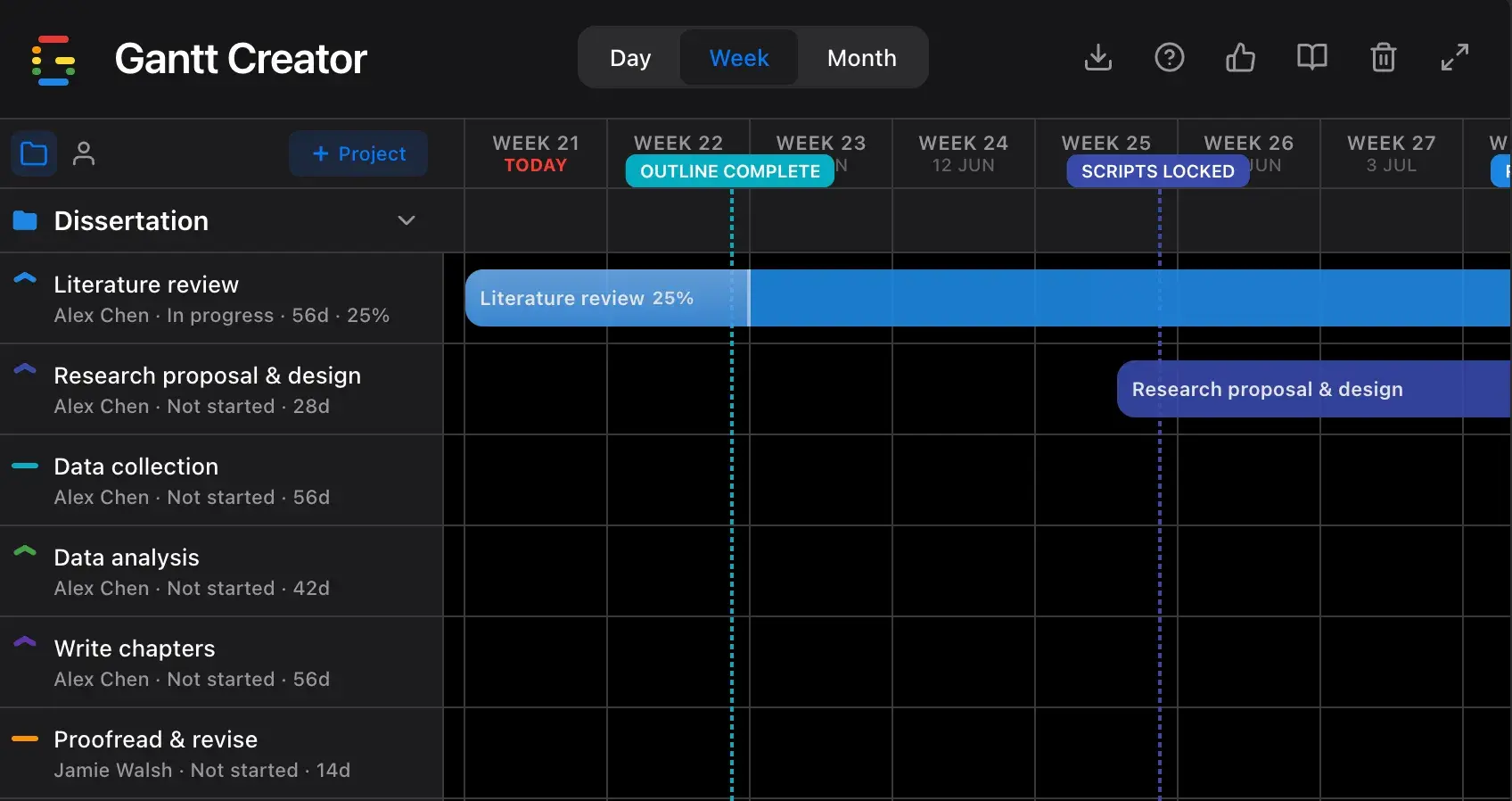
The 6 phases of a dissertation Gantt chart
Most students underestimate how much phases overlap in a real dissertation. Data collection starts before the literature review is finished. Writing begins before analysis wraps up. A Gantt chart makes those overlaps deliberate rather than chaotic.
- Identify key databases and search terms for your field
- Read, annotate, and organise sources by theme
- Map the gaps your research will address
- Write the theoretical framework and reference list
- Get supervisor feedback before moving on
- Define research questions and hypotheses
- Choose methodology (qualitative, quantitative, mixed)
- Submit ethics approval application if required
- Write and submit the formal research proposal
- Receive written approval before data collection begins
Tip: Ethics approval can take 2–6 weeks depending on your institution. Build that wait into your timeline as a separate task — it blocks everything downstream.
- Recruit participants or access your data source
- Conduct surveys, interviews, experiments, or archival work
- Store and back up data securely throughout
- Track response rates and follow up on gaps
- Clean and organise raw data as you go
- Run statistical tests, code qualitative data, or build models
- Interpret findings in relation to your research questions
- Present preliminary results to your supervisor
- Revisit the literature if findings reveal unexpected gaps
This is the highest-risk phase: analysis almost always takes longer than planned and directly delays writing. Padding 20% extra time here is the single most useful schedule adjustment you can make.
- Draft chapters in order: methodology → results → discussion → introduction → conclusion
- Submit chapters to supervisor as you finish each one
- Incorporate feedback before moving to the next chapter
- Write abstract last, once everything else is settled
- Professional proofread for grammar, style, and consistency
- Address all outstanding supervisor comments
- Format to your institution’s exact requirements (margins, font, referencing)
- Generate table of contents, list of figures, and appendices
- Submit and confirm receipt with your department
Why research timelines collapse without a Gantt chart
Dissertation delays rarely come from laziness — they come from invisible dependencies that only become visible when it’s too late to act on them:
- You can’t collect data without ethics approval.
- You can’t write the results chapter without finished analysis.
- Supervisor feedback takes time — if you submit a chapter late, the review cycle pushes every subsequent chapter back.
- The submission deadline is fixed. Every week lost upstream is a week of writing time lost downstream.
When you map these as bars on a timeline, the critical path becomes obvious — and you can see exactly how much buffer you have (or don’t have) at each stage.
How to build your dissertation Gantt chart in Gantt Creator
1. Start from the submission deadline, not today
Create a project named after your dissertation. Then set your submission deadline as a milestone first — that fixed date anchors everything. Work backwards from it to set phase end dates rather than forward from today.
2. Add one task per phase — drag edges to adjust
Create six tasks matching the phases above. Drag the edges of each bar to set durations, and drag whole bars to shift them in time. Plan the overlaps deliberately: analysis starts while data collection is still running, writing starts while analysis is wrapping up.
3. Assign resources to show who owns what
Add yourself as a resource, then add your supervisor and anyone else involved (a statistician, proofreader, co-researcher). Assign tasks accordingly. Switch the sidebar to Person view to see your own workload at a glance and spot weeks where supervisor review and data collection overlap.
4. Pin your non-negotiable dates as milestones
Add milestones for: proposal approved, ethics cleared, data collection complete, first draft to supervisor, and final submission. These are the dates that anchor the plan — when a phase runs long, milestones make it immediately clear which deadlines are at risk.
5. Update progress and status weekly
Set each task’s progress (0–100%) as you work. A translucent fill inside the bar shows how far along you are at a glance. Mark tasks Blocked when you’re waiting on ethics approval or supervisor feedback — it makes the bottleneck visible instead of invisible.
6. Use Month view for the big picture, Week for sprint planning
Switch to Month view to see the full 30-week arc — useful for supervisor meetings where you need to show overall progress. Switch to Week view when planning the next two weeks in detail. Export a JSON backup before any major revision so you can always roll back to a previous plan.
Start planning your dissertation today
Gantt Creator is free, runs in your browser, and requires no account. Open it, set your submission deadline, and build your research timeline in under 10 minutes.