Guide
YouTube Channel Gantt Chart: Plan Your Launch in 12 Weeks
Most new channels fail not from lack of talent but from lack of runway — creators publish one or two videos, see slow growth, and quit before the algorithm has had time to index them. A Gantt chart gives you a 12-week production plan that separates the setup work from the creative work, so you launch with a backlog and a schedule instead of a single video and a hope.
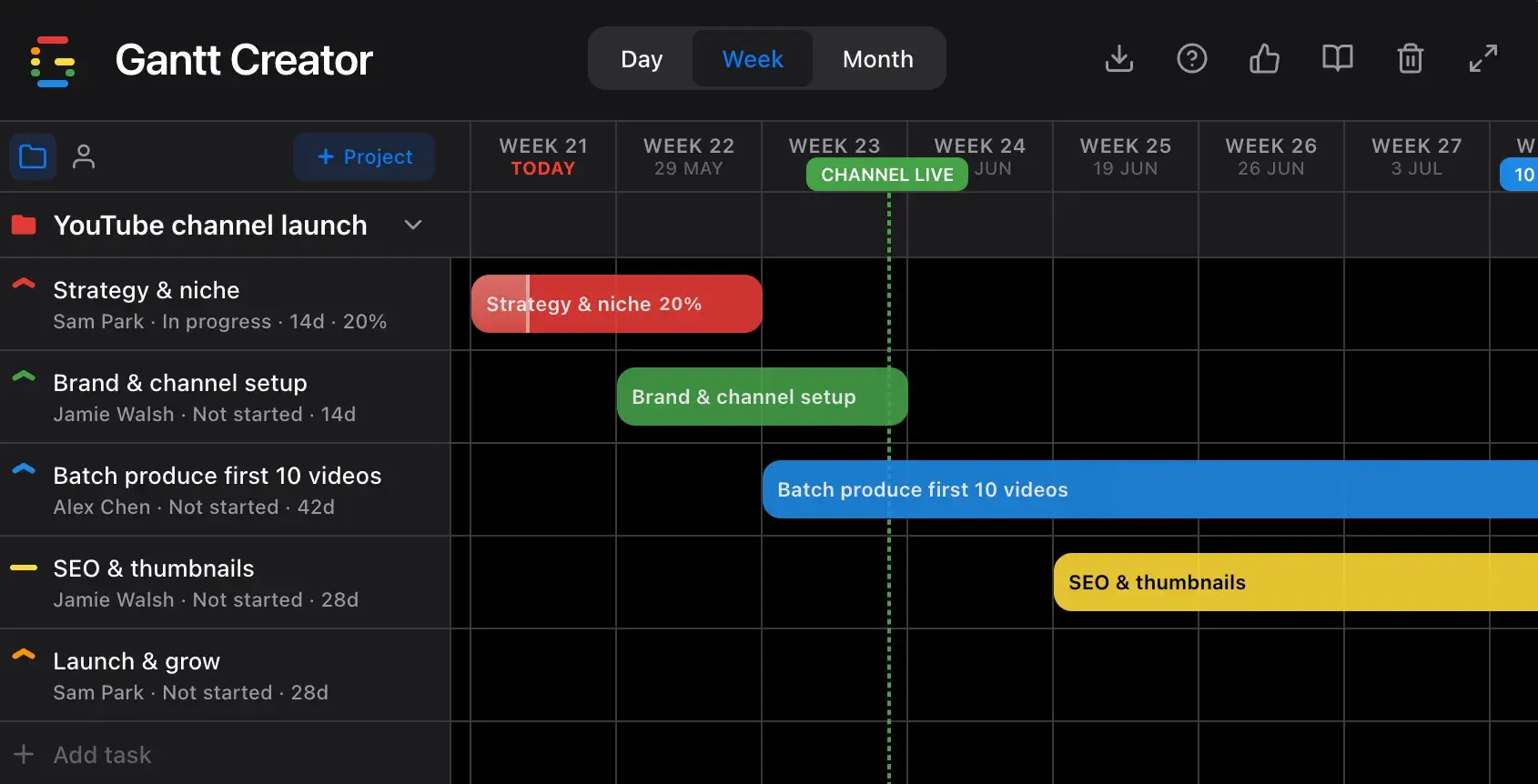
The 5 phases of a YouTube channel launch
A successful channel launch is really two separate projects running in sequence: build the foundation, then publish consistently. A Gantt chart keeps both workstreams visible so setup doesn’t bleed into your upload schedule.
- Pick a niche narrow enough to rank but large enough to sustain 100+ videos
- Identify your target viewer and what problem you solve for them
- Research 5 competitors — what they cover, what they miss, where they rank
- Define your 3–5 content pillars and map 20 initial video ideas
- Choose your channel name, handle, and URL
- Design logo, channel banner, and a repeatable thumbnail template
- Write your channel description with target keywords
- Script and film a channel trailer (60–90 seconds)
- Configure channel sections, links, and monetisation settings
- Set up playlists that match your content pillars
Tip: Finalise your thumbnail template before you film anything. Consistent thumbnails across your back-catalogue build brand recognition faster than any other single design decision.
- Script all 10 videos before filming any of them
- Film in batches by location or setup to maximise efficiency
- Edit, add captions, and export at YouTube’s recommended specs
- Create thumbnails for all 10 using your template
- Stage videos as unlisted in YouTube Studio ready for scheduling
- Research keywords for each video using YouTube Search suggest and tools
- Write titles, descriptions, and tags optimised for discoverability
- Add end screens, cards, and chapter markers to each video
- Write pinned comments ready to post the moment each video goes live
This is where a Gantt chart earns its keep: SEO work for all 10 videos can run in parallel with late-stage editing. Without a visual plan, creators do SEO last-minute and publish with half-finished metadata.
- Publish first video and announce across your existing channels
- Maintain a consistent upload cadence — 1 or 2 videos per week
- Engage with every comment in the first 24 hours of each upload
- Review analytics weekly: watch time, click-through rate, audience retention
- Double down on topics that over-perform; retire pillars that don’t
Why most channel launches stall — and how a Gantt chart fixes it
The number one reason new channels plateau early is an inconsistent upload schedule. A Gantt chart forces you to confront the real dependencies:
- You can’t film until your niche and script are locked.
- You can’t edit until you’ve filmed — but SEO research can run in parallel.
- You shouldn’t launch until you have at least 5–10 videos ready, so early subscribers find a full channel, not a single video.
- Consistency after launch requires a production buffer — which only exists if batch production was planned before launch, not after.
When you plot these dependencies on a timeline, the sequence becomes obvious and you stop confusing “I’ve been busy” with “I’m on track.”
How to build your YouTube channel plan in Gantt Creator
1. Create a project for your channel
Add a new project named after your channel. Pick a colour that matches your brand — it carries through to every task bar on the timeline.
2. Add one task per phase — drag to adjust
Create five tasks with the week ranges above. Drag bar edges to lengthen or shorten phases, and drag whole bars to shift them. The overlaps between batch production and SEO work become visually obvious immediately.
3. Assign resources — yourself and your team
Add yourself as a resource, plus a video editor or thumbnail designer if you have them. Assign the production tasks to your editor and the SEO and community tasks to yourself. Switch to Person view in the sidebar to see whether your editor is overloaded in weeks 5–7 while you’re also asking them to finish thumbnails.
4. Set milestones for your key dates
Add milestones for: channel goes live, 10 videos published, and your first subscriber target (500 or 1 000). These give you fixed reference points when the timeline drifts — and it will drift.
5. Track progress video by video
Set the progress on your batch production task as you complete each video (10 videos = 10% per video). Mark the task Blocked if your editor is waiting on footage. The translucent fill inside the bar shows how far through the batch you actually are — not how far you feel.
6. Switch to Week view to manage the upload schedule
Once you’re in the launch phase, switch to Week or Day view to plan individual publish dates. Export a JSON backup before major schedule changes so you always have a reference point for your original plan.
Start planning your channel today
Gantt Creator is free, runs in your browser, and requires no account. Open it, set your launch date, and build your 12-week channel plan in under 10 minutes.